

Fix My Lovable App: Supabase Auth Errors, RLS Bugs & Deployment Fixes
Your Lovable app worked perfectly in the preview. Then you deployed it, and either the page went blank, login stopped working, or requests started failing with errors that never showed up while you were building. This is one of the most common patterns in Lovable-built apps, and it almost always traces back to one specific mechanism: the difference between how Lovable’s preview environment and your live production environment talk to Supabase.
Why Lovable Apps Break
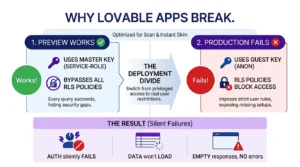
Lovable’s preview environment runs with elevated permissions that don’t exist in production. Specifically, Lovable’s preview uses Supabase’s service-role key, which bypasses Row-Level Security entirely every query works, every table is readable, because the preview isn’t subject to the same access rules a real user’s browser will be. Production uses the anon key instead, which respects whatever RLS policies are actually configured. If those policies were never properly set up which is common, since Supabase creates new tables with RLS off by default the app that worked flawlessly in preview starts failing the moment it’s live.
This single mechanism explains most of what breaks: auth that silently fails, data that won’t load, requests that return empty results instead of errors. It’s not that Lovable generates broken code it’s that the preview environment quietly hides a category of problem that production immediately exposes.
Lovable + Supabase: The Most Common Connection Errors
A few error patterns account for most Lovable-plus-Supabase issues, and each has a specific, recognizable signature you can check for directly in your browser’s DevTools.
“Failed to fetch” or a blank white page after deploying. Open your live URL and check the DevTools Console tab. If you see supabaseUrl is required, your environment variables weren’t carried over to your hosting provider Lovable’s project settings and your host’s environment variables are two separate places, and values don’t automatically sync between them.
401 or 403 errors on API requests. Check the Network tab for requests to /rest/v1/ returning 401 or 403 this means Row-Level Security is blocking the request. The fix isn’t to disable RLS (that reopens the exact vulnerability covered below); it’s to write a policy that correctly allows the specific operation your app needs, scoped to the right user.
A CORS error badge in the console. Usually means a Supabase Edge Function is missing the right headers, or a request is going somewhere your Supabase project hasn’t allowed.
“relation does not exist” errors. This means the table your code expects genuinely doesn’t exist in your database yet — sometimes because a feature was scaffolded in code before the corresponding table was created, or because Lovable’s generator doesn’t consistently re-run table creation when a new feature is added on top of an earlier build.
How to Fix Lovable RLS Misconfig Without Rebuilding
This is worth taking seriously beyond just “the app doesn’t work” RLS misconfiguration in Lovable apps isn’t a rare edge case. A May 2025 security disclosure (CVE-2025-48757) found that 10.3% of analyzed Lovable projects had Supabase tables readable by anyone holding the app’s public anon key; meaning roughly 1 in 10 apps in that dataset were exposing user data to anyone who inspected the frontend’s JavaScript bundle. Supabase creates every new table with RLS switched off by default; unless someone explicitly turns it on and writes the access policies, the table stays open.
The fix, without rebuilding anything:
- Check every table that holds user data. In Supabase, go to Authentication → Policies, and check whether RLS is enabled per table, it’s not a single project-wide switch, it’s table by table.
- Enable “Enable RLS on new tables” at the project level going forward, so any table added later doesn’t silently ship open. This doesn’t retroactively fix existing tables or write policies for you it just stops the problem from getting worse.
- Write policies scoped to
auth.uid(), not a blanket “allow all” policy, a permissive policy that just saysusing truetechnically has RLS “on” while still allowing anyone to read everything, which defeats the purpose. - Check read AND write operations separately. A table can have a correct policy for reads while inserts, updates, or deletes are left wide open; partial coverage is one of the most common misconfiguration patterns found in the wild.
- If a service-role key was ever exposed in a chat log, in source control, or in a client-side bundle rotating it is the only step that actually closes the exposure. Editing policies while the old key still works leaves the database reachable to anyone who already has it.
None of this requires rebuilding the app. It requires auditing every table individually, which is exactly the kind of methodical check that’s easy to skip when you’re focused on shipping features.
Lovable Auth Loops: What Causes Them and How to Stop Them
An auth loop looks like this: a user clicks Sign In, it appears to succeed, then immediately redirects back to the login screen, or the app hangs on a loading state and never resolves. This happens because two separate systems need to agree on your production domain: Supabase’s auth configuration and your OAuth provider’s settings. During development, both are typically still pointed at Lovable’s preview URL. Neither updates automatically when you go live.
To fix it: in Supabase, check Authentication → URL Configuration, and confirm the Site URL reflects your actual production domain, not localhost or the Lovable preview URL. Then check that your production domain is included in the allowed redirect URLs list — a login can technically succeed but still bounce the user back if the redirect target isn’t on the approved list. If you’re using a third-party OAuth provider (Google, GitHub, etc.), that provider has its own separate redirect URL configuration that also needs to be updated to match, missing this on either side is enough to cause the loop.
When a Lovable App Cannot Be Saved
Most Lovable apps hitting these issues are fixable without a rebuild; auth loops, RLS gaps, and deployment errors are all configuration problems layered on top of a working app, not signs the underlying build is unsalvageable. A rebuild becomes the more honest recommendation when the problems go deeper than configuration: when core data modeling is inconsistent across features that were added at different times, when fixing one integration reliably breaks another because there’s no coherent structure underneath, or when a service-role key exposure has been live long enough, and broadly enough, that trust in the existing database itself is the real issue rather than any single misconfigured table.
The distinction matters because the fix is so different in each case. A misconfigured RLS policy takes minutes to correct. A fundamentally inconsistent data model takes a rebuild to get right, and treating it like a configuration problem just delays finding that out.
What to Expect When You Hire Someone to Fix Your Lovable App
The starting point is always a full audit, not a guess based on the symptom you’re seeing. A blank page after deployment could be a routing issue, a missing environment variable, or a build configuration problem, the visible symptom doesn’t tell you which one, and fixing the wrong thing first just costs time. A proper audit checks environment variables, RLS policies on every table (not just the ones throwing visible errors), auth redirect configuration, and whether any credentials were ever exposed in a way that needs rotating, before touching any code.
From there, the fix addresses the actual root cause rather than patching the symptom, closing an open RLS policy properly, rather than disabling RLS entirely to make an error go away, which solves the immediate problem while recreating the exact vulnerability that caused it. The same discipline applies to auth loops, deployment errors, and everything else covered on this page: understand what’s actually happening before changing anything, fix the real cause, and verify it works in production, not just in the Lovable preview where the elevated permissions can hide a problem that isn’t actually solved.
FAQs
Why does my Lovable app work in preview but break after I deploy it?
Lovable’s preview environment uses Supabase’s service-role key, which bypasses Row-Level Security entirely. Production uses the anon key, which respects whatever RLS policies are actually configured if those policies were never properly set up, the app fails in production even though it worked perfectly in preview.
Is my Lovable app’s data exposed to the public?
Possibly, and it’s worth checking directly. A 2025 security disclosure found that roughly 1 in 10 analyzed Lovable apps had Supabase tables readable by anyone holding the app’s public anon key, because Supabase creates new tables with Row-Level Security switched off by default. Checking every table’s RLS status in Supabase’s dashboard is the fastest way to know for certain.
Why does my Lovable app show a blank white page after I deploy it?
This is almost always a client-side routing issue, not a code problem. Apps using React Router or similar need the hosting server configured to serve index.html for all routes, without that configuration, direct visits to any page other than the homepage return a blank page or a 404.
Why does login on my Lovable app redirect back to the sign-in screen?
This is typically caused by a mismatch between your production domain and what’s configured in Supabase’s auth settings and your OAuth provider, both need to be explicitly updated to your live domain, since they default to the Lovable preview URL during development and don’t update automatically when you go live.
Can a broken Lovable app be fixed, or do I need to rebuild it?
Most Lovable issues, RLS misconfiguration, auth loops, deployment errors are configuration problems on top of a working app, and are fixable without a rebuild. A rebuild becomes the better option only when the underlying data model is inconsistent in ways that go beyond configuration, which a proper audit can identify quickly.