
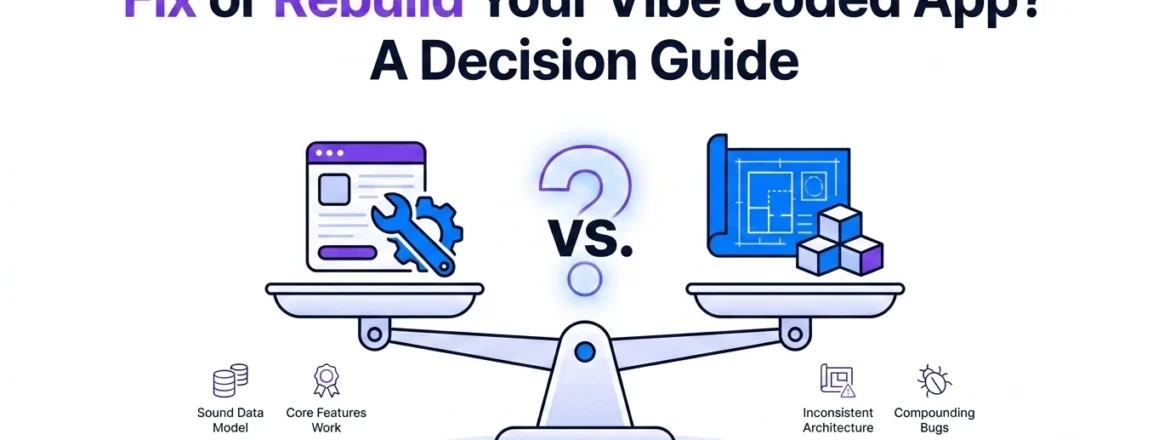
Vibe Coded App Not Working? How to Decide Whether to Fix It or Rebuild
The real question isn’t “fix or rebuild” it’s “what is actually broken, and how deep does it go.” Most vibe coded apps can be fixed without starting over, because the problem is usually contained to a specific area rather than the whole foundation. But not always, and getting this decision wrong in either direction costs real money: fixing something that needed a rebuild just delays the rebuild and adds a failed repair attempt on top of it, while rebuilding something that only needed a fix throws away work that was already good.
The Real Question: What Is Actually Broken?
Before “fix or rebuild” can be answered honestly, the actual problem needs to be identified not guessed at from the symptom, but diagnosed from the code itself. A blank page after deployment and a login that redirects in a loop can both look like “the app is broken” from the outside, but one is usually a five-minute configuration fix and the other might point to something structural, depending on what’s actually causing it.
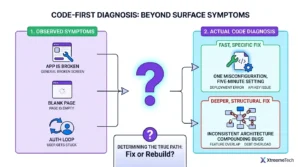
This is why a proper diagnosis comes before any fix-or-rebuild conversation, not after. Two apps that look equally broken to their founders can have completely different answers once someone actually reads the code: one might have a single misconfigured setting, the other might have inconsistent architecture spanning every feature added in the last three months. The visible symptom doesn’t reliably predict which one you’re dealing with.
Signs Your App Can Be Fixed
Most vibe coded apps fall into this category. The common thread across fixable apps: the problem is specific and traceable, even if it isn’t simple.
- The core features work. Users can do the main things the app is supposed to do the problems are in specific areas (auth, a particular integration, deployment configuration) rather than everywhere at once.
- The database and data model are sound, even if security around them isn’t. A missing Row-Level Security policy is a fixable gap. A data model that doesn’t actually represent the business logic correctly is a different, deeper problem.
- There’s one dominant problem area, not several unrelated issues compounding across the whole app. A rescue that fixes deployment and RLS in one pass is straightforward; a rescue that has to simultaneously address five unrelated problem areas is a sign of something bigger.
- You can point to when it worked. A specific session, feature, or deployment attempt where things were fine; even without knowing exactly what changed, having a “before” point makes diagnosis meaningfully faster.
- Fixing one thing doesn’t reliably break another. If a change to fix bug A consistently and predictably resolves without introducing bug B, the underlying structure is likely coherent enough to keep building on.
Signs You Should Rebuild Instead
This is the honest part most people selling repair services don’t want to say clearly: sometimes rebuilding really is the right call, even though it doesn’t feel that way when you’ve already invested time and money.
- The codebase has no consistent architecture. If different features were built in disconnected sessions, each making its own decisions about state management, data structure, or patterns, with nothing tying them together, a fix becomes a series of patches on a foundation that can’t support them.
- Every fix reliably breaks something else nearby. This is the clearest practical signal. If the codebase is so interdependent and inconsistent that changing one thing predictably causes a new problem somewhere else, incremental fixes cost more over time than a clean rebuild of the affected area.
- The technology choices themselves don’t fit what you need now. Sometimes the original build was reasonable for a prototype but genuinely can’t support what the app has grown into this isn’t a bug to fix, it’s a foundation that was never meant to carry this much weight.
- A security exposure has been live long enough, and broadly enough, that trust in the existing system is the real problem. If credentials were exposed for an extended period or user data was genuinely accessible, the conversation shifts from “patch the hole” to “can this database be trusted going forward,” which sometimes points toward rebuilding the affected part from a clean state.
Cost of Fixing vs. Rebuilding: How to Compare Fairly
The comparison only works if it’s apples to apples. A fix that resolves the actual problem and a rebuild that recreates the entire app aren’t directly comparable line items they solve different amounts of the problem, so the fair comparison isn’t “which costs less” but “which gets me to a working, trustworthy app for less total cost and risk.”
A few things worth factoring in that get missed in a quick comparison:
- What a rebuild actually throws away. Every feature that already works correctly gets rebuilt too, even the parts that were never broken that’s real, sunk cost being discarded, not just the broken parts.
- What an inadequate fix actually costs. A patch that addresses the visible symptom without fixing the underlying cause often needs to be redone later, meaning a fix that seemed cheaper upfront becomes the more expensive path once it’s fixed twice.
- Time to a trustworthy result, not just a working one. An app that runs but hasn’t had a proper security review isn’t actually done, even if it looks finished factoring that into the comparison matters, especially for apps handling real user data or payments.
For specific price ranges by fix type and platform, see the full [AI app repair cost guide].
How Long Does Each Option Take?
Timelines vary by scope more than by which option you choose. A contained fix a specific bug, a misconfigured setting, an incomplete integration is typically the faster path, often resolved in days rather than weeks, because the surrounding app doesn’t need to be touched. A rebuild, even a partial one scoped to just the broken portion, takes longer by nature, since it involves recreating functionality rather than correcting it.
The honest caveat: a fix that turns out to be more complex than it first appeared because the diagnosis reveals more compounding issues once someone is actually inside the code can end up taking as long as a smaller-scope rebuild would have. This is exactly why the diagnosis step matters before committing to either path; an estimate given before really looking at the code is a guess, not a plan.
How We Make This Decision With Clients
The process starts with a full read of the codebase not a quick look for the obvious issue, but an actual audit of what’s there, what’s inconsistent, and what’s solid. This is the same diagnosis-first approach used across every rescue project, because guessing at fix-or-rebuild from the symptom alone gets it wrong often enough to be expensive.
From there, the answer gets said plainly, even when “rebuild” is the honest answer and a smaller fix would be the easier sell. A triage process built on 168+ delivered projects has seen both outcomes often enough to know that recommending a fix for something that needs a rebuild just delays the real cost and that recommending a rebuild for something that only needed a fix wastes money and throws away work that was already good. The diagnosis drives the recommendation, not the other way around.
If the app can be fixed, the next step is scoping exactly what that involves and what it costs before any work starts not a vague estimate, a clear picture based on what the audit actually found. If it needs a rebuild, that gets explained honestly too, along with what from the existing build, if anything, is worth carrying forward rather than discarding entirely.
FAQs
How do I know if my broken app can be fixed instead of rebuilt?
The clearest signal is whether the problem is contained to a specific area auth, deployment, one integration versus spread across the whole codebase with no consistent underlying structure. A proper code audit can usually answer this within a focused review, rather than requiring you to guess from the symptoms alone.
Is it cheaper to fix or rebuild a vibe coded app?
It depends entirely on what’s actually broken. A contained fix is almost always cheaper than a full rebuild, but an inadequate fix that doesn’t address the real cause can end up costing more overall if it needs to be redone. The fair comparison accounts for what a rebuild discards (features that already worked) against what a poor fix risks (having to fix it twice).
What are the clearest signs I should rebuild instead of fix my app?
The strongest signal is that fixing one thing reliably breaks something else nearby that pattern indicates the underlying architecture can’t support incremental changes. Inconsistent structure across features built in disconnected sessions, and technology choices that no longer fit what the app needs to do, are the other clearest signs.
How long does it take to fix a broken vibe coded app versus rebuilding it?
A contained fix is typically faster, often resolved in days. A rebuild takes longer because it involves recreating functionality rather than correcting it, though a fix that turns out more complex than expected once someone is actually in the code can end up taking as long as a smaller rebuild would have.
Can every vibe coded app be saved, or are some too broken to fix?
Most can be fixed rather than rebuilt, because the problem is usually contained rather than foundational. A rebuild becomes the honest recommendation mainly when the codebase has no consistent architecture to build on, or when a security exposure has compromised trust in the existing system deeply enough that starting the affected part fresh is the safer path.