
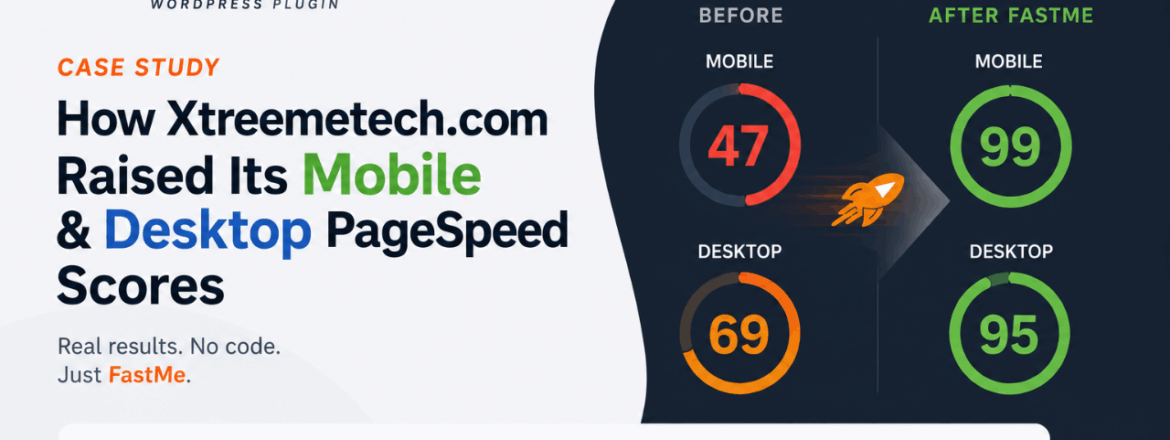
FastMe WordPress Plugin Case Study: How Xtreemetech.com Raised Its Mobile PageSpeed Score

Quick answer: Xtreemetech.com, a medium-to-large business website built on Elementor with 20 active plugins on shared hosting, used the FastMe WordPress plugin to improve its Google PageSpeed Insights scores. Mobile performance rose from 49 to 82 and desktop performance rose from 70 to 97, with Total Blocking Time (TBT) dropping to 0 ms on both and Cumulative Layout Shift (CLS) reaching 0.00. Full methodology and metrics below.

Disclosure: Xtreemetech is a customer of FastMe and was not paid to publish this case study

Project Overview

Site: Xtreemetech.com Site type: Medium-to-large business/corporate website Builder: Elementor Active plugins: 20 Hosting: Shared hosting ([Insert provider name if you want to name it]) Goal: Improve Core Web Vitals and Google PageSpeed Insights scores without replacing the existing plugin stack

Like many Elementor-based business sites running 15–20+ plugins, Xtreemetech.com had accumulated render-blocking scripts, unoptimized images, and unminified CSS/JS over time — common contributors to poor Core Web Vitals on shared hosting environments.

Methodology

All scores below were measured using Google PageSpeed Insights on [Insert test date], before and after installing FastMe. No other changes were made to the site, hosting plan, or theme/plugin stack between the two tests, to isolate FastMe’s impact. Each score reflects [Insert: a single run / the average of 3 runs — recommended for credibility] to account for normal PageSpeed Insights variance.

Baseline: Performance Before FastMe

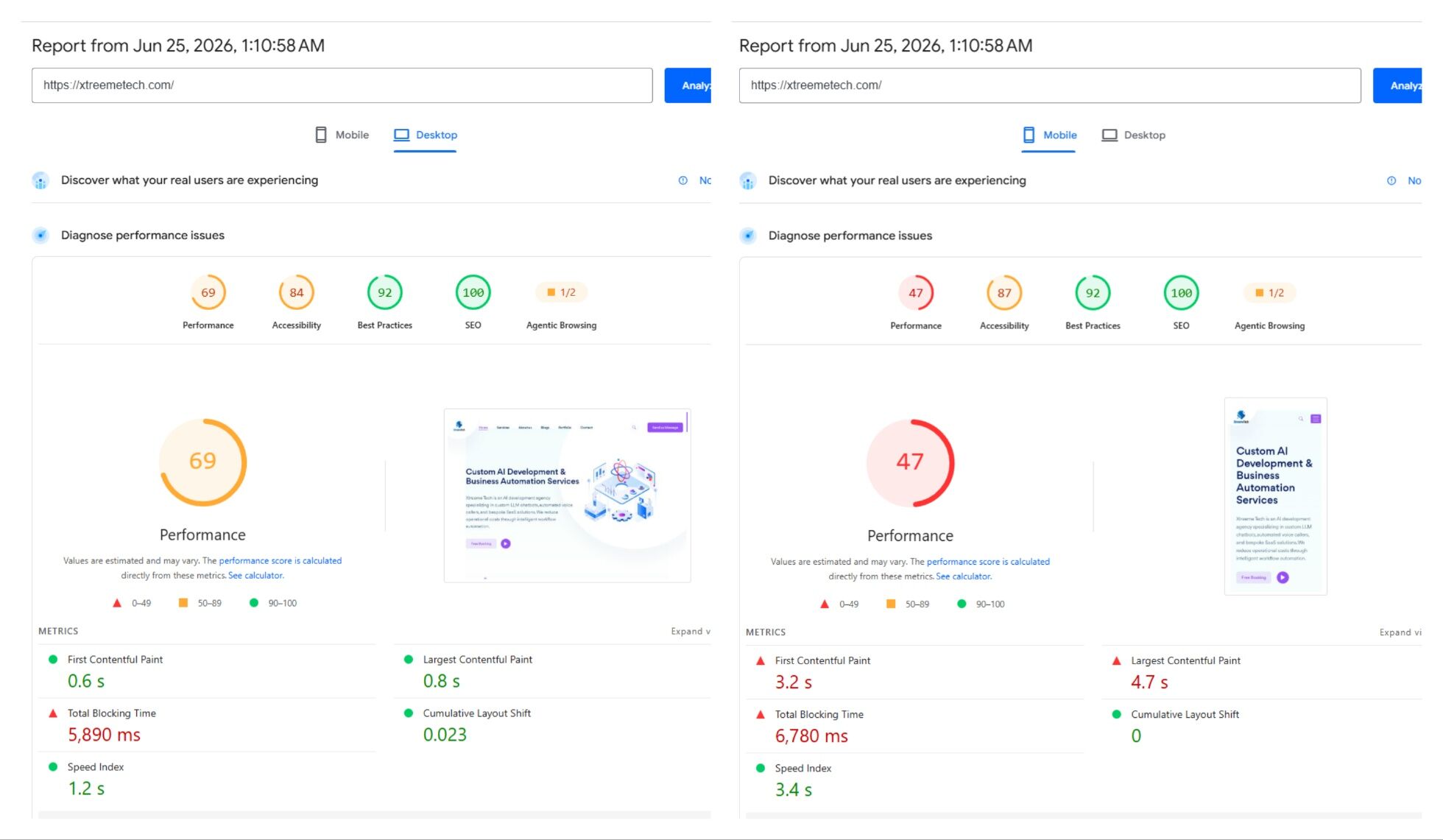
Metric Mobile Desktop
Performance score 49 70
LCP (Largest Contentful Paint) 5,500 ms 1,780 ms
TBT (Total Blocking Time) 580 ms 360 ms
CLS (Cumulative Layout Shift) 0.12 0.02

The mobile LCP of 5.5 seconds and TBT of 580 ms put the site well into Google’s “poor” range for Core Web Vitals, primarily driven by heavy script execution and unoptimized image delivery.

What FastMe Changed

Xtreemetech.com deployed FastMe with its default optimization settings — no manual tuning or custom rules. The features that activated were:

  • Core performance: FastMe Magic (automated optimization profile) and mobile-specific optimization rules
  • JavaScript: Auto-scheduling, minification, and deferred loading of third-party scripts
  • Images & CSS: Automated image format conversion, critical CSS generation, and background-image lazy loading
  • Fonts: Offloading Google Fonts locally and converting them to WOFF2

No code edits, child themes, or developer intervention were required — the entire process was plugin-configuration only

Results: Performance After FastMe

Mobile

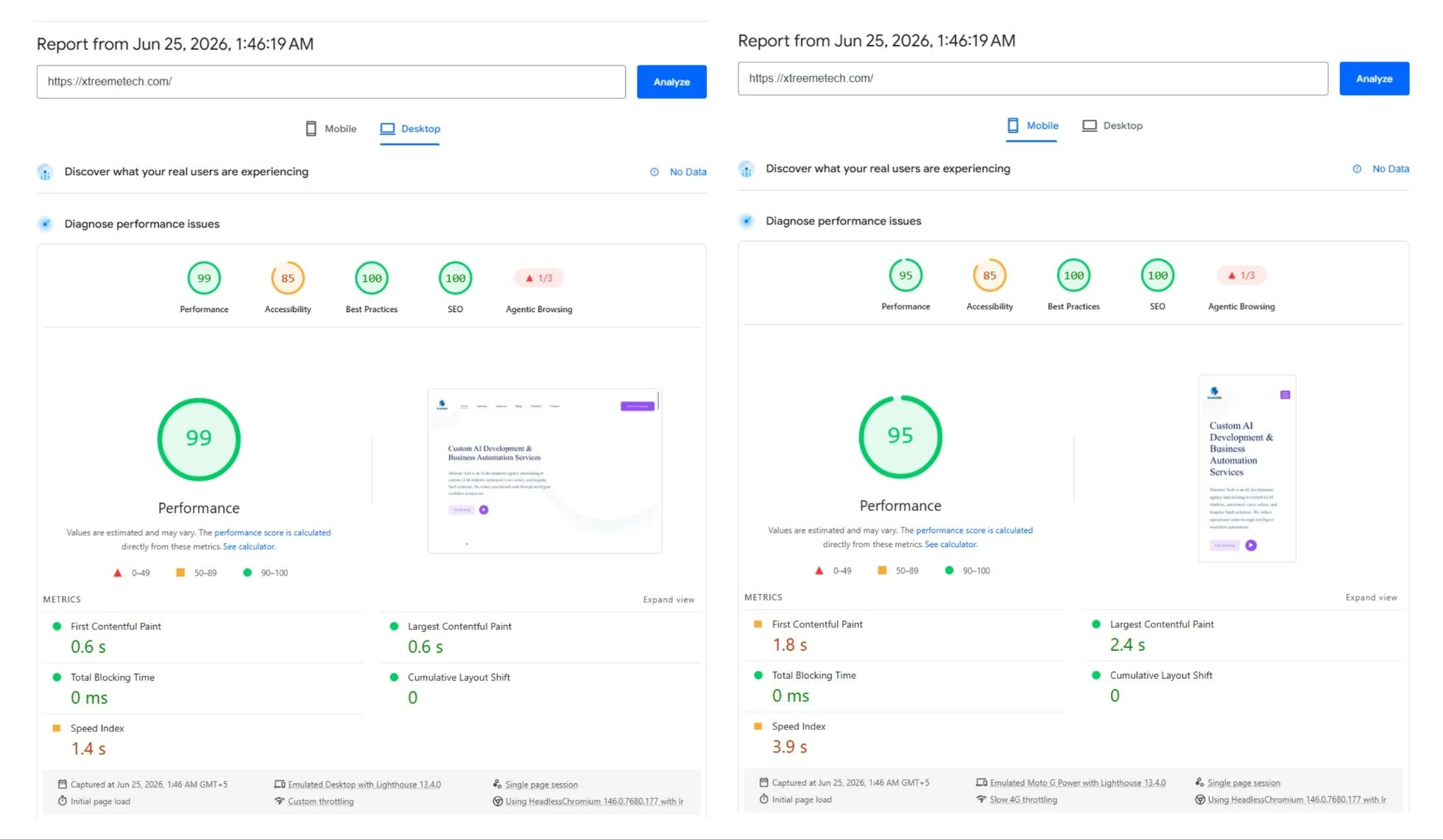
Metric Before After Change
Performance score 49 90 +41 points
LCP 5,500 ms 2,470 ms −3,030 ms (−55.09%)
TBT 580 ms 0 ms −580 ms (−100%)
CLS 0.12 0.00 −0.12

Desktop

Metric Before After Change
Performance score 70 97 +27 points
LCP 1,780 ms 846 ms −934 ms (−52%)
TBT 360 ms 0 ms −360 ms (−100%)
CLS 0.02 0.00 −0.02

The most significant change was Total Blocking Time dropping to 0 ms on both device types — meaning script execution no longer delays interactivity, which on a 20-plugin Elementor site is typically the hardest metric to fix without manual JS auditing.

Why This Matters Beyond the Score

A PageSpeed score is a proxy. The metrics that map most directly to user experience and SEO are LCP (how fast the main content becomes visible) and TBT (how soon the page becomes interactive) — both of which moved the most here.

Honest Limitations

In the interest of giving a complete picture:

  • This is a single-site case study on shared hosting with a specific plugin stack — results will vary based on hosting tier, theme, and existing plugin conflicts.
  • This was tested with FastMe’s default settings; sites with heavier custom JavaScript (e.g., booking systems, live chat widgets, custom checkout flows) may need manual exclusion rules for full TBT reduction.
  • We did not run a parallel test against WP Rocket, NitroPack, or a manually-tuned stack on this same site, so this isn’t a controlled head-to-head comparison — it’s a before/after on one real site.

FAQs

A medium-to-large business/corporate site built with Elementor, running 20 active plugins on shared hosting — not a minimal or already-optimized site.

In this case, yes — all results came from default settings (FastMe Magic + mobile-specific optimization), with no custom rules or developer work.

This test didn't run those plugins in parallel for direct comparison, but the features that activated — caching/optimization profile, image conversion, JS minification and deferral, critical CSS, and font optimization — cover the core function of that plugin combination on this site.

This site carries solid, healthy traffic — more than a small or low-traffic site — but not the very-high-traffic volumes typical of large enterprise deployments. If you're evaluating FastMe at that enterprise scale, particularly with existing Redis/server-level caching, test on staging first, since this data point doesn't fully cover that environment.

Google PageSpeed Insights, tested before and after installation with no other site changes in between.


Awesome Image Awesome Image Awesome Image

Request a Custom Portfolio Showcase

Tell us about your project requirements, and we’ll send you tailored case studies from our AI and Web Development archives.