
Fix My Replit or Claude Code App: What Goes Wrong and How to Recover
Replit Agent and Claude Code solve a similar problem in different ways: one builds inside a hosted environment, the other works directly against your codebase from the command line. They also tend to break in different ways.
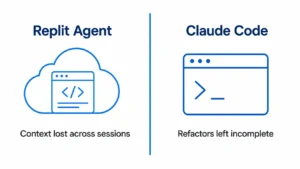
Replit apps usually break from context getting lost across a long build; Claude Code apps usually break from a refactor that started but never finished. Both are recoverable, and both follow patterns Atif and the team have seen repeatedly, including a recent case where a UK founder’s Claude Code project was stuck, fixed, and deployed to a live server within days.
Why Claude Code and Replit Builds Break
Both tools are agentic; they don’t just generate code once, they take multiple steps, make decisions along the way, and adjust based on what they find. That’s what makes them powerful for getting an app most of the way built quickly. It’s also exactly why they break in ways a simple code generator wouldn’t.
Replit Agent builds inside a hosted environment, and each new Agent session is scoped fairly narrow. That’s a deliberate design choice, but it means a project built across several sessions can end up with decisions that don’t agree with each other. An approach to authentication settled in one session gets contradicted or misunderstood in the next, because the reasoning behind the original decision isn’t fully visible to Agent later on. The result: Agent fixes the thing you asked about, and something else that was working quietly stops working.
Claude Code operates directly on your codebase from the command line, often in longer, more open-ended sessions. Its agentic mode is built to solve the whole problem it’s given, not just the narrow line you pointed at which means it will sometimes touch files or logic adjacent to what you asked for, because it judged them relevant. Over a long session, this can leave a codebase partway through a migration or refactor: some files reflect the new approach, some still reflect the old one, and nobody explicitly decided to stop halfway.
Neither of these is a defect in the tool. Both are the predictable cost of giving an AI system enough autonomy to be useful across multiple steps. The same autonomy that makes it fast also makes it capable of drifting from a consistent, coherent codebase if nobody is checking in on what it changed and why.
Replit Agent Context Loss: What It Is and How to Recover
Replit Agent context loss happens because each new Agent chat session is deliberately scoped, it reads your code and a small project instructions file, but it doesn’t carry forward the reasoning behind earlier decisions from previous sessions. The Replit stays the same; what Agent remembers about why it’s built that way doesn’t fully carry over.
This shows up in a few recognizable ways: Agent re-asks about architecture decisions that were already settled, suggests an approach that was deliberately rejected in an earlier session, or makes a change on a Wednesday that quietly conflicts with something built the previous Monday not because the code changed, but because the session’s understanding of it did.
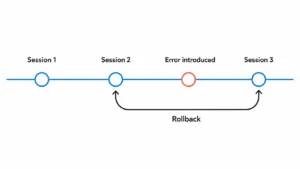
Recovery starts with Replit’s own checkpoint system, which is more capable than most people realize. Every meaningful step Agent takes creates a checkpoint: a full snapshot of your project’s files, database state, and Agent’s context at that moment, not just a code diff.
These checkpoints are visible in three places: the Agent tab (with descriptions and rollback options), the Git pane (as full commits), and the History view inside Agent chat (a complete timeline). Rolling back to a checkpoint doesn’t just restore your files, it restores the Agent’s understanding to match, so its behavior lines up with the state you’re rolling back to instead of continuing to act on a context that no longer matches the code.
Practical recovery steps:
- Stop Agent immediately if it’s stuck in a loop of breaking and re-fixing the same issue continuing to prompt through a loop usually compounds the confusion rather than resolving it.
- Check the Agent tab or History view for the last checkpoint before things went wrong, not just the most recent one. Sometimes the useful rollback point is several steps back, not one.
- Use File History (in the Tools sidebar) if the issue is isolated to one or two files rather than the whole project state; this is a lighter-weight fix than a full project rollback.
- Re-enter any Secret values after rolling back or forking, since Replit’s rollback/fork process restores secret names but not their values, a common source of “it rolled back but now nothing connects” confusion.
For context that’s been lost across sessions rather than broken by a bad change, the fix is different: keeping a persistent written record of key architecture decisions what stack, what conventions, what was deliberately rejected and why outside the chat session itself, so it can be reintroduced at the start of each new session rather than re-derived (or re-guessed) from the code alone.
Sometimes the loss is deep enough, or spans changes complex enough, that rolling back and re-explaining isn’t the fastest path. That’s usually the point where a rescue makes more sense than continuing to patch it session by session.
Claude Code Incomplete Refactors: How to Diagnose and Finish Them
An incomplete Claude Code refactor usually looks like this: some files reflect a new pattern, others still reflect the old one, and nothing explicitly documents where the line between them sits. This happens for a specific, recurring reason Claude Code’s agentic mode will often touch more than what was asked. Told to change one component, it may also rename an inconsistent variable it noticed, restructure a related utility function, or extend the change to files adjacent to the original request, because it judged them relevant to a coherent fix. Each individual decision can be reasonable; the aggregate effect across a long session is a codebase that’s been partially, inconsistently transformed.
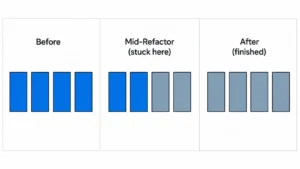
A second common cause: Claude Code sessions can terminate before a full task list is actually complete, particularly on longer, multi-step refactors leaving some planned changes done and others still pending, without always making that split obvious at a glance.
Diagnosing what’s actually half-finished:
- Check for duplicate or orphaned logic: Search the codebase for function names that might have been recreated rather than reused (grep -r “functionName” src/ is a fast first pass) a sign Claude Code rebuilt something that already existed elsewhere because it didn’t have full visibility into the file that already handled it.
- Look for inconsistent patterns across similar files: If some components use one state-management approach and others use a different one, or the codebase has multiple HTTP clients doing the same job, that’s the signature of a refactor that started in one direction and didn’t fully propagate.
- Review what was actually planned versus completed: If the original session had a task list or todo list, checking it against what’s actually in the codebase sessions can end with some items still pending, marked completely inconsistently, or not marked at all.
Finishing it safely, rather than starting over:
- Diagnose before changing anything: Ask for a full audit of the current state: what’s inconsistent, what’s half-done, what patterns coexist without applying any changes yet. Understanding the actual scope of the incomplete work prevents fixing it twice.
- Scope the finishing work narrowly: Rather than “finish the refactor,” specify exactly which files or functions still need to move to the new pattern, and instruct explicitly that nothing else should change; this prevents a second round of unplanned scope creep on top of the first.
- Show the callers, not just the file: If the incomplete refactor touches a function or interface other code depends on, make sure any session working on it can see what it calls, refactoring a function in isolation, without visibility into what depends on it, is exactly how a second file quietly breaks.
- Use checkpoints as an undo, not a diagnosis tool: Claude Code automatically checks points as it works, and commands like a rewind function can restore code, conversation context, or both useful for recovering from a bad step, but it doesn’t tell you where the refactor stopped making sense. That still requires a manual review of what’s actually in the codebase now.
If the inconsistency has compounded across many files and sessions rather than staying contained to one clear area, a full audit from someone who can see the whole picture rather than working file by file is usually faster than continuing to patch it in isolated pieces.
Deployment Failures After Claude Code or Replit Builds
A Replit or Claude Code app that works while you’re building it and breaks the moment it goes live is one of the most common patterns in AI-assisted development and it’s rarely a sign the underlying app is broken. It’s usually a gap between how the app behaves in a development environment and what production actually requires.
For Replit apps specifically, the most common cause by a wide margin: secrets and environment variables set in your workspace do not automatically carry over to a deployment. If your production app suddenly shows undefined values, failed API calls, database connection failures, or login errors that didn’t happen in the editor, this is the first thing to check production secrets need to be added separately in the Deployments pane, not just the workspace Secrets panel.
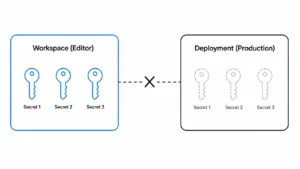
A few other Replit-specific deployment issues worth checking:
- Port configuration. Your app needs to bind to 0.0.0.0, not localhost, and the external port mapped in your .replit file needs to route correctly; a mismatch here causes the platform’s health check to fail even though the app itself is running fine.
- Deployment type mismatch. An app with server-side logic, authentication, or database calls needs an Autoscale or Reserved VM deployment, not a Static deployment, which only serves static files and can’t run backend code.
- The deployment logs, not just the editor console. Replit’s deployment logs often show the actual production error, which can be more specific and different from anything visible while building.
For Claude Code projects, deployment failures more often trace back to configuration or dependency differences between your local environment and wherever the app actually gets hosted a package that installed and worked locally but wasn’t properly declared for the production build, an entry point or start command that only worked because of local defaults, or environment variables that were hardcoded during development instead of pulled from a proper configuration source.
In both cases, the underlying pattern is the same: the build tool got you to something that runs, but “runs in this specific environment” and “runs reliably in production” are different bars. Diagnosing which specific gap caused a given deployment failure and fixing it without introducing a new one is usually faster with a second set of eyes than by cycling through the same fix attempts repeatedly.
Real Example: How We Finished a Broken Claude Code App
A founder in the UK had been building an app with Claude Code far enough along that it represented real time and money invested, not far enough along that it was usable. He’d hit a point familiar to a lot of Claude Code users: the build had stalled somewhere between “mostly working” and “actually deployable,” and continuing to prompt through it wasn’t closing that gap.
Our team at Xtreeme Tech started where every rescue starts: a full read of what was actually in the codebase, not just what the founder remembered asking for. That diagnosis step matters most on projects like this one, where a long agentic session may have made changes and decisions that were never fully explained back to the person who owns the project.
From there, the fix was straightforward once the actual state of the code was understood: resolve what was incomplete, get the app working end-to-end, and deploy it to a live server not just confirm it ran locally, but confirm it actually worked in production, the way a real user would encounter it.
The founder’s own words afterward were simple: Atif and the team helped him fix the code quickly and deployed it to the server, and he’d work with them again. He has, in fact, returned for further work since which matters here specifically, because a diagnosis-first approach that actually fixes the underlying problem, rather than patching the visible symptom, tends to be what brings a client back rather than somewhere else the second time something needs attention.
This is a Development & MVP engagement, priced based on the real scope of what was broken, the same pattern used across every rescue project, since a single bug fix and a stalled multi-session build require very different amounts of work to get right.
Should You Abandon a Claude Code App or Have It Fixed?
Most of the time, the app is worth finishing rather than abandoning the patterns covered on this page (context loss, incomplete refactors, deployment gaps) are recoverable, not fatal, because the underlying application logic is usually intact even when the surrounding execution is messy. Abandoning a project and starting over throws away the parts that already work, not just the parts that are broken.
Signs the app is worth fixing:
- The core features function, even if inconsistently, and the problems are traceable to specific sessions or specific files
- The confusion is architectural or configuration-related (contradicting patterns, missing production setup) rather than the app never having worked at all
- You can point to a rough “before it broke” point a session, a feature, a deployment attempt even if you can’t pinpoint the exact cause
Signs a rebuild might genuinely be faster:
- Multiple long sessions have each introduced their own inconsistent patterns, with no single dominant architecture left to build on
- Every attempted fix by you or the AI tool reliably breaks something else nearby, suggesting the underlying structure can’t support incremental changes
- The scope of what was actually built has drifted significantly from what’s needed now, and finishing it as-is would mean carrying forward decisions that no longer make sense
The honest test: a proper diagnosis should be able to point to specific, nameable problems “this file has a broken auth flow,” “these two components use conflicting state patterns” rather than a vague sense that “something is wrong somewhere.” If a diagnosis can’t get more specific than that after a real look at the code, that’s itself useful information about how tangled the project has become.
This is also where a second, non-invested set of eyes helps most. It’s hard to judge objectively whether your own stalled project is closer to “needs a few focused fixes” or “needs to be rebuilt” when you’re the one who’s been stuck in it which is exactly the judgment call a proper code audit is built to answer honestly, rather than defaulting to whichever answer is more profitable to say.
FAQs
Why does my Replit app work in the editor but break after I deploy it?
Almost always a configuration gap between your workspace and your deployment most commonly, secrets and environment variables set in the workspace don’t automatically carry over and need to be added separately in the Deployments pane. Port binding and deployment type mismatches are the next most common causes.
Why did Claude Code change files I didn’t ask it to change?
Claude Code’s agentic mode is built to solve the whole problem it’s given, not just the narrow line you pointed at so it will sometimes touch adjacent files or logic it judges relevant to a coherent fix. This is a known behavior pattern, not a malfunction, but it’s exactly why incomplete or inconsistent refactors happen across longer sessions.
Can a Replit Agent project recover from lost context?
Yes, in most cases. Replit’s checkpoint system captures your project’s full state files, database, and Agent’s context at each meaningful step, and checkpoints are visible in the Agent tab, Git pane, and History view. Rolling back to an earlier checkpoint restores Agent’s understanding to match, which resolves a lot of context-loss confusion without starting over.
Is it better to fix a broken Claude Code or Replit app, or start over?
Fixing is usually faster and cheaper, since the underlying application logic is typically intact even when the execution around it is messy. A rebuild tends to make more sense only when multiple sessions have left conflicting architecture with no clear pattern to build on, or when repeated fix attempts keep breaking something else nearby.
How do I know if my stalled Claude Code or Replit project can still be saved?
A proper diagnosis should be able to name specific problems, a particular broken flow, a particular file with conflicting logic rather than a general sense that something is wrong. If a real look at the code can get that specific, the project is very likely fixable.