
AI App Rescue & Repair: What It Is, Who Needs It, and How It Works
You built something with Bolt.new, Lovable, Replit, or Claude Code. It worked in the preview. Then you deployed it, or tried to add real users, or connected Stripe and it broke. AI app rescue is the process of diagnosing what’s actually wrong with an AI-built app and fixing it, without starting over. At Xtreeme Tech, We have done this on over 168 delivered projects, from single bug fixes to full production rebuilds.
What Is AI App Rescue?
AI app rescue is the practice of taking an app built by an AI coding tool, one that’s broken, incomplete, or unsafe to launch and getting it to a working, production-ready state. It’s not a rebuild by default. Most of the time, the underlying app is closer to working than it looks; the problem is usually a handful of specific, diagnosable issues rather than a fundamentally broken foundation.
This service exists because tools like Bolt.new, Lovable, Replit, and Claude Code are genuinely good at getting an app to 80% fast, often in a single afternoon. That last 20%, the part that involves production auth, real payment handling, and security that holds up outside a demo, is where most AI-built apps stall. That gap is what AI app rescue closes.
Why Do Vibe Coded Apps Break?
Most AI-built apps break for the same reason: the AI generated code that satisfies what you asked for, not the unstated assumptions an experienced developer would apply automatically to things like access control, input validation, and production-safe configuration. The app works in every test you happen to run. It fails the moment a real user, a real payment, or a real attacker interacts with it in a way you didn’t anticipate.
This isn’t a rare edge case. Independent research from Veracode, CodeRabbit, Escape.tech, and Tenzai has converged on the same finding: AI coding tools systematically reproduce security vulnerability patterns that human developers learned to avoid over the past two decades. The most visible public example: in early 2026, an AI-built social platform called Moltbook exposed 1.5 million API tokens and 35,000 email addresses within three days of launch the root cause was a misconfigured Supabase database left with public read and write access, the same category of issue Xtreeme Tech finds routinely in client audits.
The recurring root causes fall into a few buckets:
- Missing production configuration: The app worked in the builder’s preview environment, which is configured differently from a live domain auth redirects, CORS rules, and environment variables that exist in preview often don’t carry over to production.
- Security left disabled by default: Row-Level Security, rate limiting, and authorization checks are the parts of an app that don’t show up when you’re testing the happy path, so they get skipped until they’re the thing that gets exploited.
- Context loss over long build sessions: AI agents don’t retain full project memory indefinitely. Long or complex builds accumulate inconsistencies as earlier decisions get forgotten or contradicted later in the session.
- No one reviewing for what isn’t there: Code review normally catches gaps. Vibe-coded apps often ship without anyone checking for the protections that were never added in the first place, because the AI never flags what it left out.
None of this means the tools are bad, it means “it works in the preview” and “it’s safe to run in production” are two different bars, and AI builders are optimized for the first one.
Which Platforms Break Most Often?
Every AI app builder fails in its own characteristic way, shaped by how it’s architected. Knowing which platform built your app tells us what to check first.
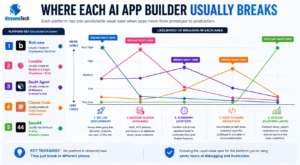
Bolt.new apps most often break on deployment, not in the builder itself. The app runs fine in Bolt’s preview, then fails after going live usually because Supabase auth redirects, environment variables, or CORS settings were configured for the preview URL and never updated for the production domain.
Lovable apps tend to break around Supabase integration specifically. Lovable provisions a full backend automatically tables, auth, Row-Level Security policies which is convenient, but it means RLS misconfiguration is baked in from the start if it wasn’t reviewed. This was serious enough that a 2025 vulnerability disclosure (CVE-2025-48757) found over 170 production Lovable apps had been generated without working Row-Level Security at all.
Replit Agent builds tend to break from context loss across sessions. Each new Agent chat is intentionally scoped narrow, so a project built over multiple sessions can end up with contradictory decisions one session’s auth approach conflicting with another’s, or a feature built to spec on Monday getting misunderstood on Wednesday because the reasoning behind it wasn’t preserved anywhere Agent could see.
Claude Code projects most often break from incomplete refactors, a migration or restructuring that got started but not finished across a long session, leaving the codebase in a half-migrated state where some files reflect the old pattern and some reflect the new one.
Base44 apps are typically stable while you stay inside the platform, but hit a ceiling, limited export options and vendor lock-in mean the “break” is often less a bug and more a wall: you’ve outgrown what the platform can do and now need to move the app somewhere it can keep growing.
None of these are platform failures in the sense of the tool being bad; they’re what happens when a tool optimized for getting you to a working prototype fast meets the very different demands of a production app with real users.
How to Fix a Broken Vibe Coded App?
The process starts with diagnosis, not code. Before touching anything,The team at Xtreeme Tech map exactly what’s broken and why because “fix vs rebuild” is a decision, not an assumption, and getting it wrong wastes the client’s money either way.
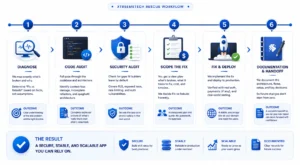
- Code audit: A full pass through the codebase and architecture to understand what’s actually there not what the client thinks is there. This is where context-loss damage, incomplete refactors, and spaghetti architecture get identified, before any fix is attempted.
- Security audit: A dedicated check for the gaps AI builders leave by default: Row-Level Security, exposed API keys, missing rate limiting, and authentication flows that work in testing but fail under real conditions. This step runs on every project, regardless of what the client asked for because an app that “works” but leaks user data isn’t actually fixed.
- Scope the fix: With the audit complete, the client gets a clear picture: what’s broken, what it will take to fix it, what it will cost, and how long it will take. This is also the point where fix-vs-rebuild gets decided honestly; sometimes the right answer is rebuild, and that gets said plainly rather than upsold around.
- Fix and deploy: The actual repair work, followed by production deployment not just “it works on my machine,” but verified working on the live domain, with real auth, real payment flows if applicable, and real users in mind.
- Documentation and handoff: Vibe-coded apps almost never come with documentation, because there was no human writing it down as they went. Part of the rescue is creating that record so the client, or whoever they work with next, isn’t starting from zero again if something needs to change later.
This isn’t theoretical. Two recent examples show what it looks like in practice:
-
A developer in Germany had built an app using Jules.Google that was, in his words, too buggy to actually use. After the audit and fix, he described the result simply: it was bug-free and usable and told other builders relying on AI coding tools to use this service if they hit the same wall.
-
A founder in the UK had gotten stuck with an app built using Claude Code far enough along to matter, not far enough along to launch.Our team diagnosed the issue, fixed the code, and deployed it to a live server. He’s since returned for further work.
A founder in the UK had gotten stuck with an app built using Claude Code far enough along to matter, not far enough along to launch. Our team diagnosed the issue, fixed the code, and deployed it to a live server. He’s since returned for further work.
Both of these were Development & MVP engagements, priced based on the actual scope of what was broken, not a flat rate regardless of complexity, which is part of why the diagnosis step comes first.
Can Every App Be Rescued, or Do Some Need a Rebuild?
No, and the honest answer is part of what makes the diagnosis worth paying for. Most vibe-coded apps can be fixed rather than rebuilt, because the problem is usually contained: a handful of specific bugs, a missing security layer, a deployment configuration that never got updated for production. Fixing those doesn’t require touching the parts of the app that already work.
Sometimes the answer is different. If the app has no coherent architecture to begin with, if every feature was patched on top of the last without any underlying structure a fix becomes a series of temporary patches on a foundation that can’t support them. In that case, a rebuild is genuinely the cheaper, faster path, even though it doesn’t feel that way at the start.
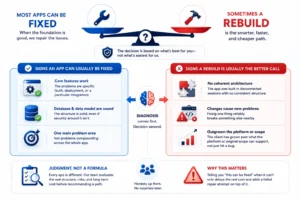
Decision framework: Fix vs Rebuild
Signs an app can usually be fixed:
- The core features work; the problems are specific (auth, deployment, a particular integration)
- The database schema and data model are sound, even if security around them isn’t
- There’s one main problem area, not problems compounding across the whole app
Signs a rebuild is usually the better call:
- The app was built in disconnected sessions with no consistent architecture
- Fixing one thing reliably breaks something else nearby
- The client has grown past what the platform or the original scope can support, not just hit a bug
This is a judgment call, not a formula which is why it’s the first thing our team looks at before any fix work begins, not something decided after the invoice. Telling a client “this can be fixed” when it can’t just delays the real cost and adds a failed repair attempt on top of it.
How Long Does It Take to Fix a Broken AI App?
It depends entirely on what’s broken; a single deployment configuration issue can be resolved in hours, while a security overhaul across an app with no access controls can take weeks. The diagnosis step exists specifically to give an honest answer to this question before any commitment is made, rather than a generic estimate that turns out to be wrong once work starts.
As a general shape, based on projects delivered through Xtreeme Tech:
- Single, isolated bugs (a deployment error, an auth redirect issue, a broken integration) typically the fastest fixes, often turned around in a matter of days.
- Security audits and RLS/access-control fixes usually last a few days to a week, depending on how much of the app touches user data.
- Multi-issue repairs spanning several failure areas commonly a few weeks, similar in scope to a project like a client’s engagement completed over 6 weeks.
- Larger rescues involving architecture work or ongoing development can extend to a month or more, particularly for apps that need both an immediate fix and continued build-out afterward, as with a long-term engagement.
The variable that matters most isn’t the platform, it’s how contained the problem is. A broken app with one clear failure point is usually fast. A broken app where problems compound across authentication, data, and deployment takes longer, because each fix has to be verified against the others before anything ships.
When Should You Hire an AI App Rescue Specialist?
The short answer: when you’ve hit the point where continuing to prompt the AI tool is costing more time and money than getting a human to look at it. That point tends to show up in a few recognizable situations.
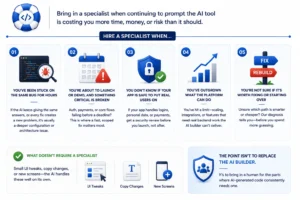
You’ve been stuck on the same bug for hours: If you’ve asked the AI to fix the same issue repeatedly and it keeps coming back or the fix introduces a new problem each time that’s usually a sign the issue is in configuration or architecture the AI can’t see clearly, not something more prompting will resolve.
You’re about to launch or demo, and something critical is broken: Auth, payments, or a core flow failing days before a deadline isn’t the moment to keep experimenting. This is where a fast, scoped fix matters more than a from-scratch understanding of the whole codebase.
You don’t know if your app is safe to put real users on: If you haven’t had a security review and your app handles logins, personal data, or payments, that’s worth checking before launch, not after something goes wrong. Most AI-built apps haven’t had this check by default.
You’ve outgrown what the platform can do: Sometimes nothing is technically “broken” ; you’ve just hit a wall the AI builder can’t get you past, whether that’s a scaling limit, an integration it can’t handle, or a feature that needs real backend work.
You’re not sure if it’s worth fixing or starting over: This one doesn’t require certainty before reaching out; it’s exactly the question the diagnosis step is built to answer. Guessing wrong here, in either direction, costs more than getting an honest read first.
What doesn’t require a specialist: small UI tweaks, copy changes, or new screens the AI handles well on its own. The point isn’t to replace the AI builder, it’s to bring in a human for the parts where AI-generated code consistently needs one.
FAQs
How to fix a broken vibe coded app?
Start by identifying exactly what’s broken deployment, authentication, database connection, or something else since the fix depends entirely on the failure type. Most vibe coded apps can be repaired without a full rebuild: the process is a code audit, a security audit, scoping the actual fix, then repairing and redeploying. For a full walkthrough, see the repair process section above.
Can my broken AI app actually be fixed, or do I need to rebuild it?
Most of the time, yes it can be fixed. The majority of broken AI-built apps have a specific, containable problem (auth, deployment, a particular integration) rather than a fundamentally broken foundation. A rebuild is usually only the right call when the app has no consistent architecture to begin with. The honest answer comes from a diagnosis, not a guess see our fix vs. rebuild guide for the full breakdown.
How much does it cost to fix a vibe coded app?
It depends on what’s broken and how much of the app is affected. A single bug fix costs far less than a full security overhaul or multi-issue repair. Real project costs from delivered work range widely based on scope. Full pricing detail is in our cost guide.
What platforms do you fix? Does it matter if I used Bolt.new, Lovable, Replit, or Claude Code?
We work across all of them. Each platform tends to fail in its own characteristic way Bolt.new apps typically break on deployment configuration, Lovable apps around Supabase/RLS setup, Replit and Claude Code projects from context loss across long build sessions. Knowing which platform you used helps us know what to check first, not whether we can help.
Is my AI-built app safe to launch, or does it have security problems I don’t know about? Possibly not, and it’s worth checking before real users are on it. Row-Level Security, exposed API keys, and missing rate limiting are among the most common gaps in AI-generated apps, because they don’t show up when you’re testing the parts of the app you built to test. A security audit is part of every rescue engagement, regardless of what the client originally asked for.
I’ve been stuck on the same bug for hours and the AI keeps failing to fix it. What now?
If you’ve made several attempts and the same issue keeps returning, or fixing it breaks something else, that’s usually a sign the problem sits in configuration or architecture the AI tool can’t diagnose on its own. At that point, a short conversation with someone who’s seen the pattern before is often faster than continuing to prompt.